
Emails tied to the order, the payment, and the repeat sale
KendaliCRM turns email into the communication layer of your CRM: transactional emails, templates, SMTP accounts, domains, open/click tracking, MailLog, suppression, and automated follow-up sequences all run inside a single sales cycle.
Here, email is part of the operating system — not an external email service
In a typical setup, email lives apart from the CRM: the order is in one place, the template in another, SMTP in a third, reminders in a fourth. In KendaliCRM, everything is gathered into a single loop: the email knows the order number, the amount, the offer, the payment link, the customer status, and the reason it was sent.
An order created, a payment, a cancellation, a group buy, or support.
Subject, HTML, text, placeholders, and the email version.
Sent through the chosen SMTP and a verified domain.
Opens, clicks, errors, bounce, complaint, and suppression.
Ready-made scenarios for orders, payments, group buys, support, and partners
The system ships with a set of templates across the key groups: auth, order, payment, skladchina, support, and partner. Each template can be opened, edited, tested, localized, and restored from version history.
Subject + HTML + text
A template stores the subject line, the HTML version, and the plain-text version of the email. This matters for correct delivery and readability across different email clients.
Versioning
Changes are saved to history. You can roll back to a previous version if a new edit weakened the message, the formatting, or deliverability.
Localization EN/RU/UK
Emails match the language of your project and audience. This is especially important for international sales and mixed markets.
The email fills in order data automatically
- the author never copies the amount, email, or offer name by hand;
- the data is pulled from the CRM context at the moment of sending;
- the payment link and access are personalized for each customer;
- one template serves many orders without edits;
- both the subject and the body support value substitution;
- placeholders are the same across every language of the email.
Subject: Order #{{order_number}} — access granted

Hello, {{buyer_name}}!

Payment for the offer "{{offer_name}}"
in the amount of {{amount}} {{currency}} has been received.

Access to your material:
{{pay_url}}

— KendaliCRM
Every important event knows which email to send
Routing connects a CRM event to a specific template and notification channel. For each event you can enable or disable email and Telegram, and disabled rules will never be re-sent by accident.
Order created
The buyer has created an order but has not paid yet. The system sends an email with the amount, the offer, and the payment link.
Payment confirmed
After payment, the email delivers access, instructions, the file, or the next step in the product.
Refund / cancel
The customer receives a clear notification about a refund, a cancellation, or a change in order status.
Support / partner
Support, partner invitations, payouts, and system events are never lost to a manual process.
Reminders are set up right where the sale happens
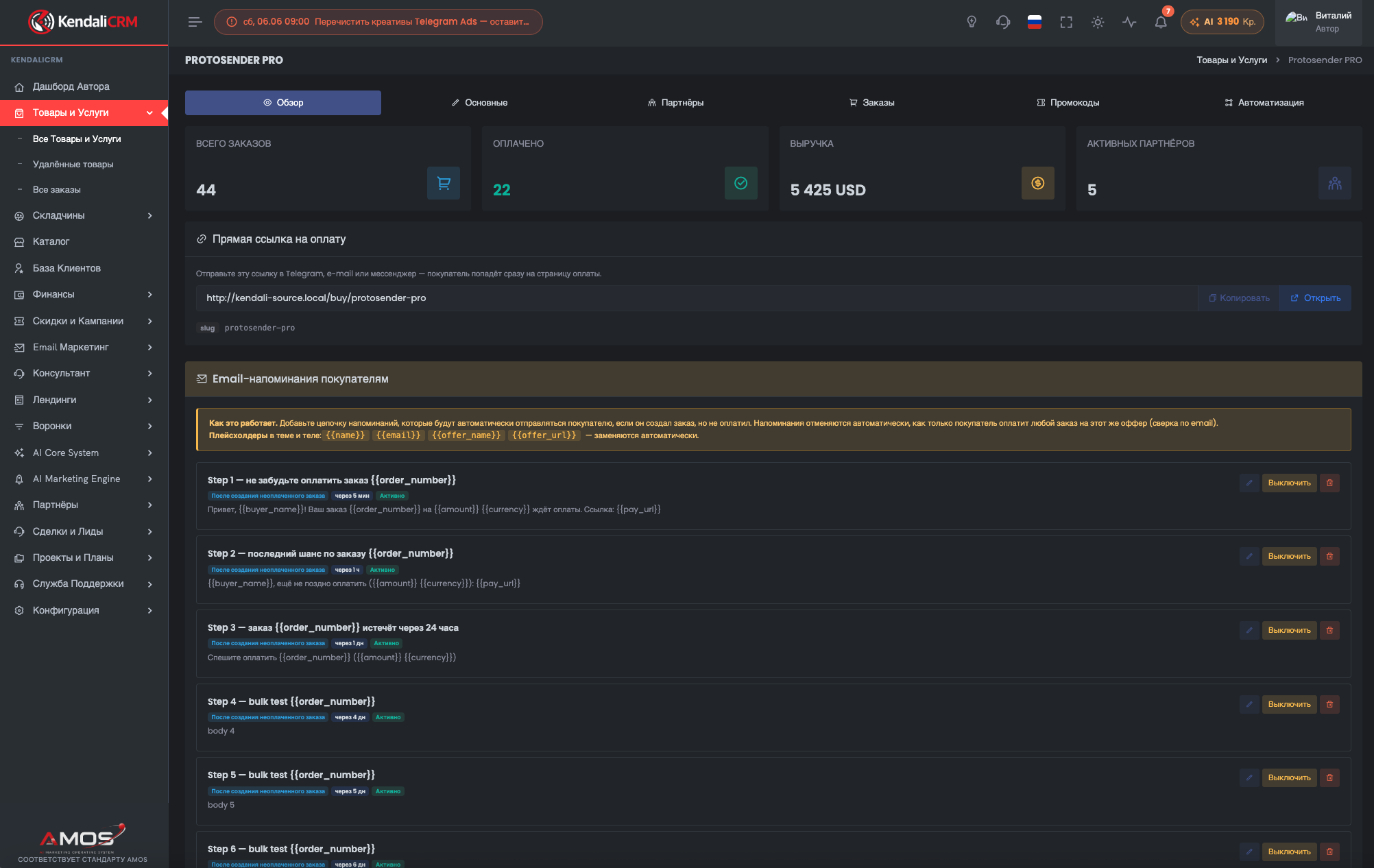
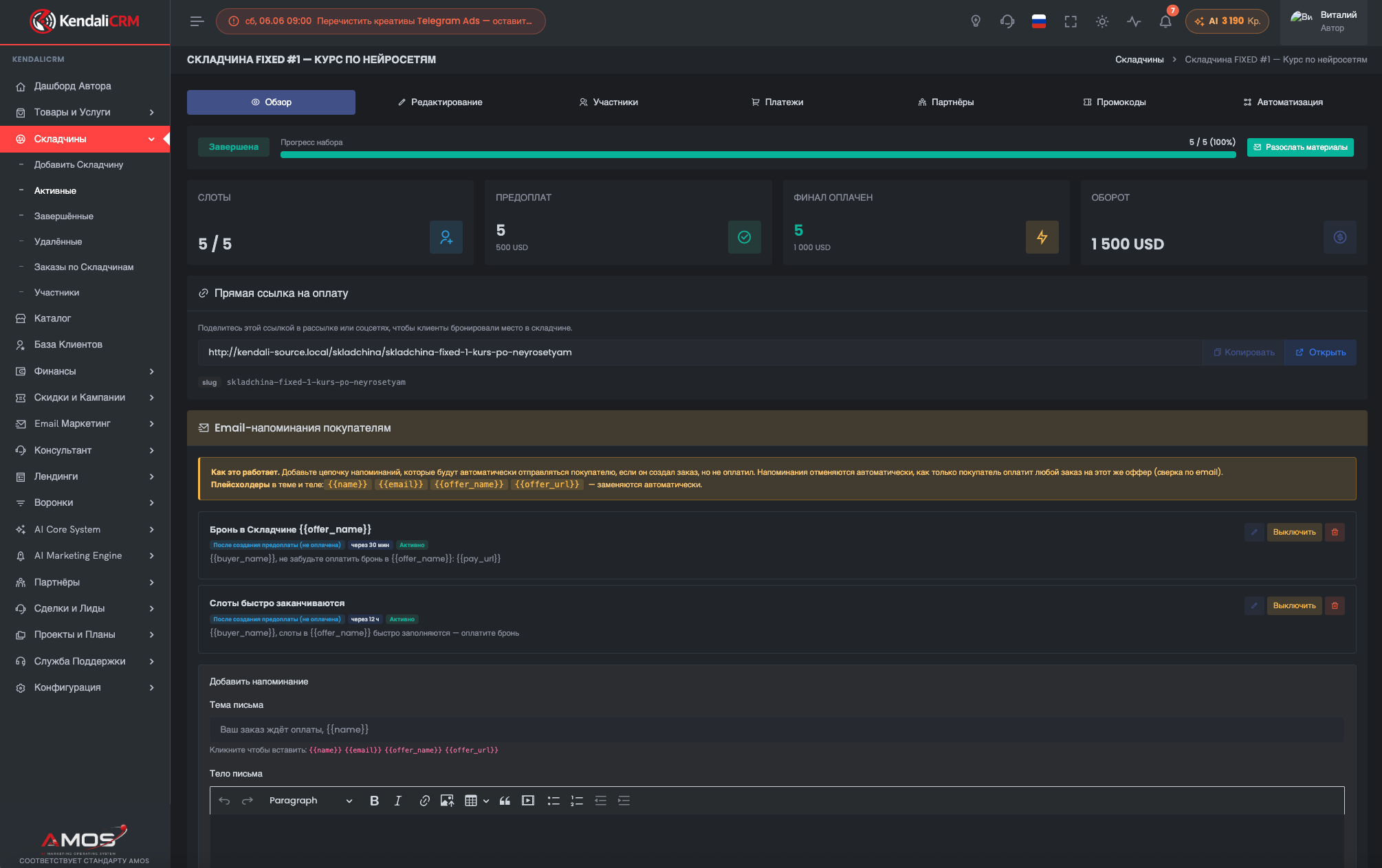
Follow-up sequences live next to the product or group buy. The author sees the offer itself, the orders, the partners, the promo codes, and the email reminders in a single working context.
Your own mail infrastructure, under the owner's control
KendaliCRM does not lock the author into a single external sender. SMTP accounts are added in the settings, the password is stored encrypted, and an account can be tested, set as the default, or deleted with a fallback scenario.
DNS setup for your domain: SPF, DKIM, DMARC
The system provides instructions for SPF, DKIM, and DMARC and shows the verification status of your records, so your emails look correct to mailbox providers.
- SPF — the list of authorized sending servers;
- DKIM — the cryptographic signature of your domain;
- DMARC — the handling and reporting policy;
- multiple SMTP accounts with a default selection.
Automatic follow-up on unpaid orders with no manual oversight
A follow-up starts when an order is created or canceled, takes the order type into account, schedules emails with a delay, and automatically stops if the customer pays. This cuts losses at the "awaiting payment" stage.
Trigger
order_created or cancelled, with a filter by order type.
Scenario
A sequence of steps with their own delays, subject lines, and email copy.
Scheduling
Emails are queued the moment the order is created.
Cron delivery and auto-stop
Background delivery on schedule, idempotently; the sequence is canceled on payment or when the offer is deleted.
Every email leaves a measurable trace
MailLog shows the date, the recipient, the template, the subject, the status, opens, clicks, and errors. Opens are recorded by a pixel, clicks by tracking links, and bounce and complaint automatically protect your list through suppression.
Open tracking
The open pixel helps you see which templates are actually read and which need a new subject line, send time, or copy.
Click tracking
Links in emails pass through tracking, so you can see who clicked on payment, access, the offer, or an important instruction.
Suppression
Addresses with a bounce, complaint, unsubscribe, or manual block receive no new emails. This protects the sender's reputation.
The email module covers the entire path from the first order to retention
This isn't a standalone "email blaster" — it's communication logic built into your sales, payments, group buys, support, and partner program.
When email is tied to the CRM, every send becomes part of the sale
The template knows the order, SMTP knows the domain, follow-up knows the payment status, MailLog knows the result, and suppression protects the list. That's how email turns from a manual chore into a managed layer of growth.