
Money, payments and profit — in one secure system
KendaliCRM connects USDT TRC-20 payments, orders, refunds, holds, partner commissions, expenses and profit into a single financial model. The author doesn't just see "how much was paid" — they see how much is actually available, how much is frozen, what's owed to partners and which business delivers real net profit.
Finance in KendaliCRM is not a revenue spreadsheet
It's a connected financial layer that understands where the money comes from: which offer was sold, through which landing the buyer arrived, whether a partner was involved, whether the refund window is active, whether there's a hold, what share of the amount is available, what expenses were entered and what ROI the funnel produced.
The order gets a status, and the financial record is created automatically.
Funds can be frozen due to a refund, a group buy or risk.
A refund doesn't rewrite history — it creates a separate reverse operation.
Revenue is linked to expenses, channels and funnel ROI.
Available, frozen, sales and refunds — right on the first screen
The finance module shows money in the working state of the business: what can already be withdrawn, what's still protected by a hold, which sales went through during the period, which refunds were issued and how much needs to be paid out to partners.
Available balance
Shows the amount that has already cleared the retention rules and can be used by the business owner. This isn't "raw turnover" — it's a more honest operational figure.
Frozen
Holds set aside potentially risky or not-yet-finalized money: the refund window, an incomplete group buy, suspicious activity or a manual freeze.
Refunds & reversals
Full and partial refunds go through a financial reversal. History is never rewritten: each reverse operation is recorded separately.
The financial record stores the origin of every amount
- operation type: sale, reversal, commission, withdrawal or adjustment;
- the amount in the operation currency and the amount in the author's base currency;
- a link to the order, offer, partner and the reason for the operation;
- hold status, release date and the basis for the freeze;
- a history that can't be deleted or rewrite the past.
Sale               Protosender PRO payment   +250 USD
Partner commission Partner commission 30%    -75 USD
Hold release       Refund window closed      +175 USD
Refund reversal    Partial refund            -50 USD
Withdrawal         Partner payout, TX hash   -75 USD
  → history is protected, the past is never rewritten
Native crypto payments without banks or payment aggregators
KendaliCRM can accept USDT TRC-20 directly: the system generates the amount, displays a QR code, tracks the invoice TTL, scans the blockchain via TronGrid and marks the order as paid on an exact transaction match.
From checkout to blockchain confirmation
- the author's USDT address is protected from accidental edits and can only be changed by an administrator;
- the TronGrid API key is stored encrypted;
- each invoice gets a unique amount with 5 decimal places;
- the payment page shows the QR code, address, amount and a countdown;
- a background scanner looks for the transaction by address, exact amount and the USDT contract;
- there's a test mode, manual verification of incoming payments and two-step confirmation.
invoice
  → amount with sub-cent (5 decimals, e.g. 250.04173 USDT)
  → QR code + author's wallet address
  → TTL 02:00:00 (countdown)
  → TronGrid scan: address + exact amount + USDT contract
  → TX match → order paid → finance ledger
The system doesn't mix turnover with available money
In a typical CRM, a payment often looks like profit right away. In KendaliCRM, money passes through retention rules. This protects the author from premature partner payouts, refunds, unfinished group buys and suspicious activity.
Refund window
A standard window after a product is paid for. The money is recorded but may stay frozen until the period ends.
Group buy prepayment
Prepayments are held until the group is finalized, then move into the refund window.
Risk hold & manual freeze
An extra freeze for a suspicious partner scenario, low conversion confidence or by the author's manual decision.
Payment
The order moves to paid, financial operations and related side effects are created.
Freeze
The amount or commission goes into a hold with a reason and a possible release date.
Decision
A hold can be released, canceled with a reversal or left to auto-release.
History
Every change is recorded as a new operation without breaking the financial timeline.
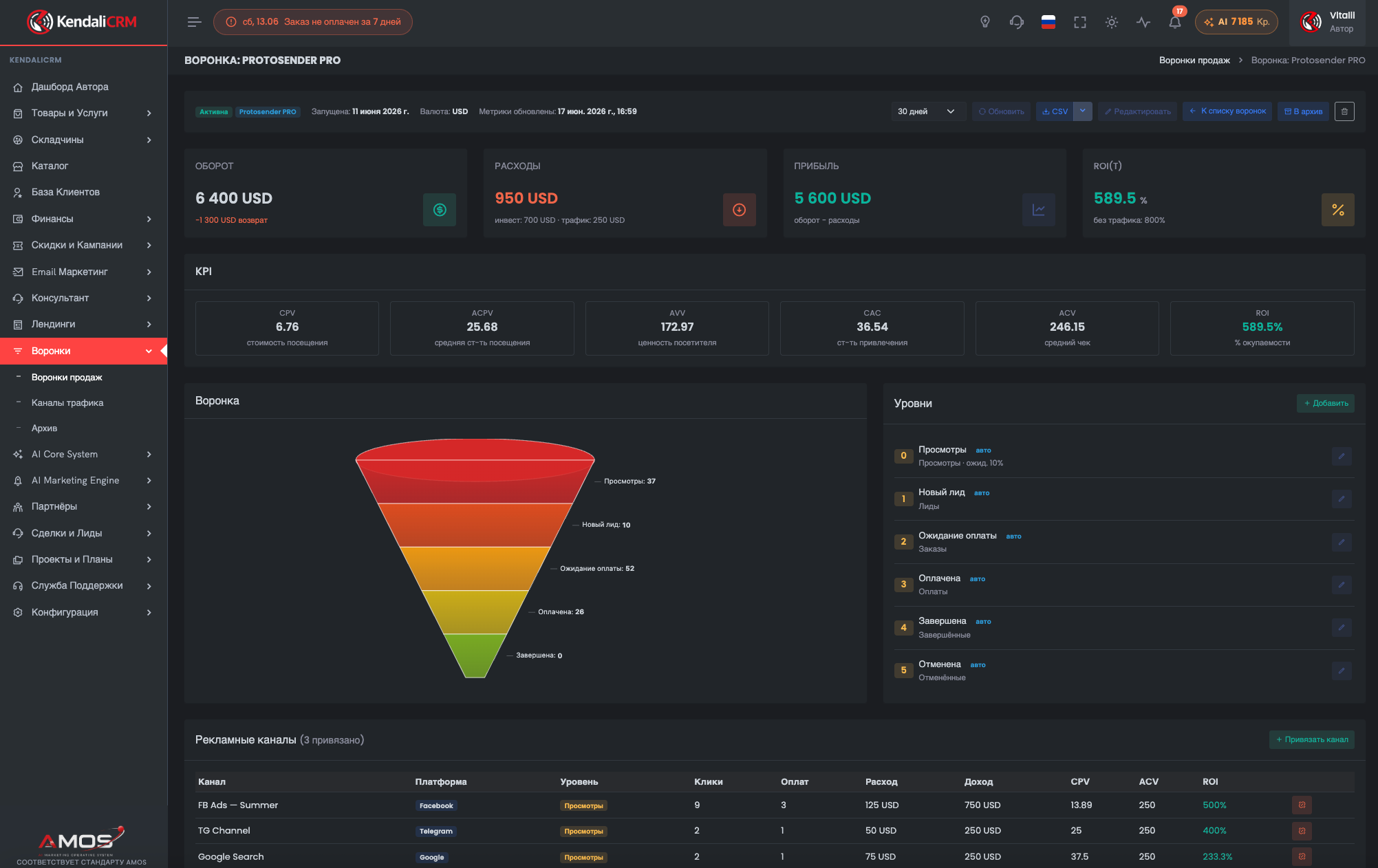
Finance is tied to funnels, so ROI is calculated on real data
The system accounts not only for paid orders, but also for refunds, ad spend, investments, partner commissions and the author's profit. This lets you make decisions about channels and offers based on economics, not gut feeling.
The total of paid orders for the period.
Turnover minus refunds.
Traffic, advertising and investments.
Net revenue minus expenses.
Profit / investment × 100.
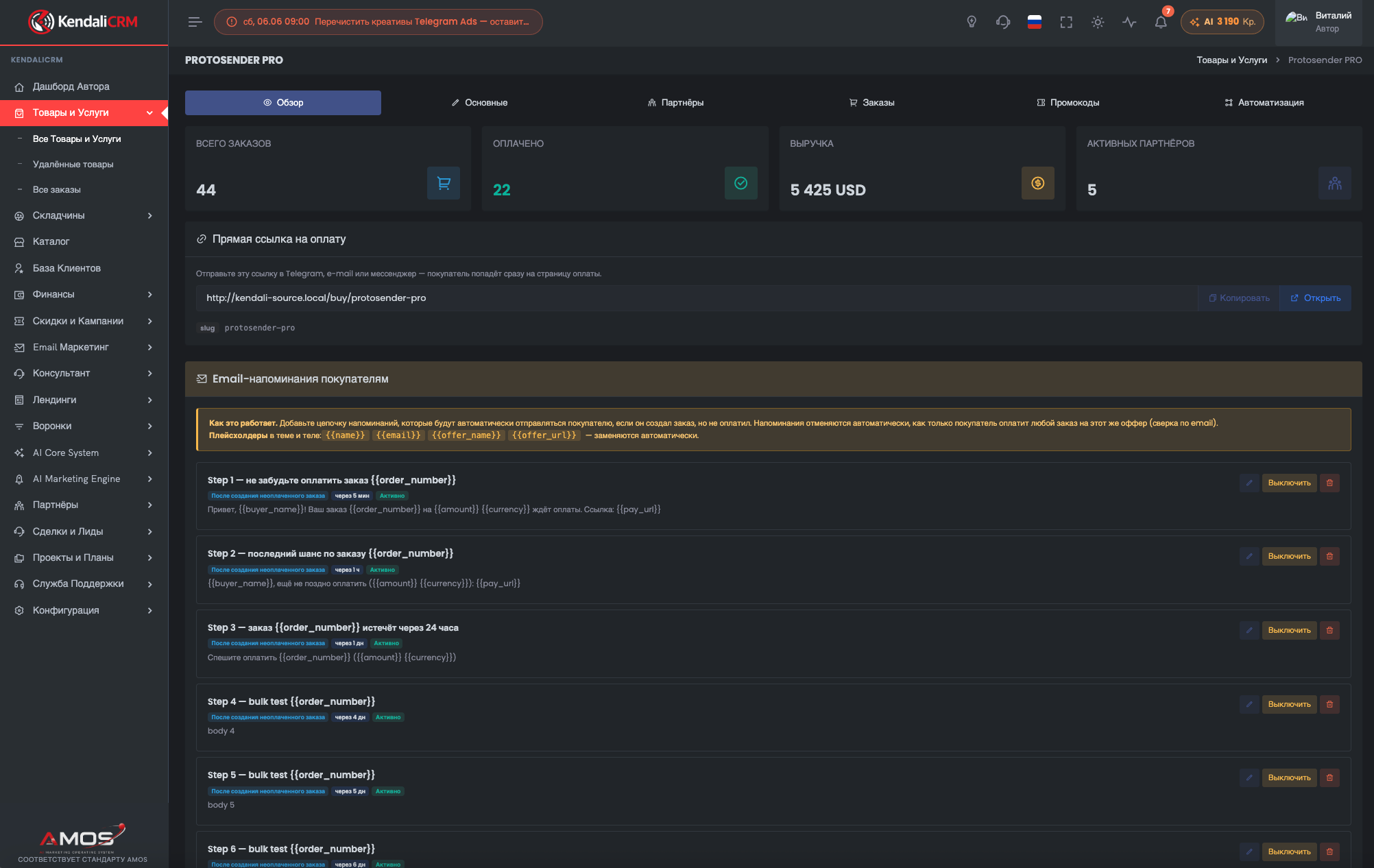
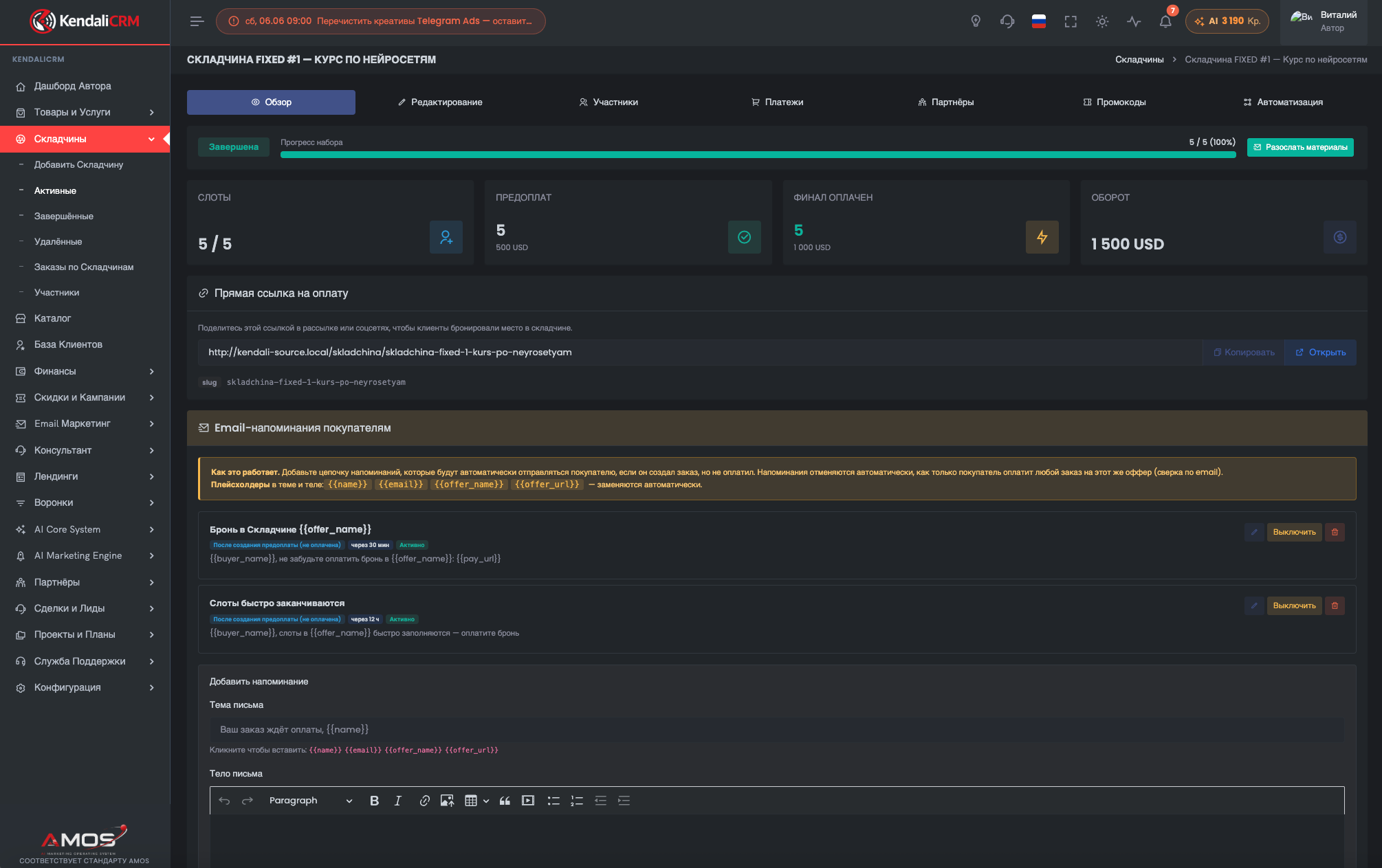
Money is visible not only in "Finance," but in every commercial object
Product and group-buy cards show sales, paid orders, revenue, active partners, direct payment links and automated reminders. This helps you manage money right from the offer's context.
The financial layer protects the author from chaos, refunds and manual errors
When sales, USDT, affiliates, refunds and expenses live in one system, the business sees its real economics — not pretty turnover, but manageable profit.
Finance becomes part of the business operating system, not a separate accounting headache
KendaliCRM gives the author the full cycle: accept USDT, confirm the order, hold risky amounts, process a refund, pay out a partner, calculate profit and see the funnel ROI.